Payment Options with Bills Payment
21 April 2020
Dear Valued Customer(s),
Payment Options with Bills Payment
With reference to the implementation guidelines on the Enhanced Community Quarantine and the Stringent Social Distancing Measures over the entire Luzon by the Philippine government dated March 16, 2020, OOCL will take safety measures to protect its employees, customers and stakeholders.
Philippines banks remain open and we will continue to provide various payment methods using Banco De Oro's cash management services to fulfil your banking and payment needs.
1. Payment via Over-the Counter thru Bills Payment
Cash/check, peso/dollar payment. Fill up Check/Cash Transaction Slip with details:
Company Name: OOCL or Orient Overseas Container Line
Institution Code: 9230 (peso) or 9260 (dollar)
Subscriber account no: B/L reference number (should be 10digits)
Subscriber Name: Client's company name
2. Payment via Online Fund Transfer: Attached herewith is BDO Online and Mobile Banking Step by Step Guide for your own convenience and the safest options nowadays.
a. Payment via Business Online Banking
We encourage to transact your payment thru fund transfer. Your account should be enrolled to corporate online banking to proceed with online transfer. Kindly coordinate with your respective branch of account for the activation of your Corporate Internet Banking facility.

b. Payment via BDO Retail Internet Banking
Online payments via BDO Retail Internet Banking is convenient for individual brokers/forwarders and SME's with limited transaction. You may refer to step by step guide of this facility.
Step 1: Login to BDO Retail Internet Banking (RIB).

Step 2: From the main menu, go to Send Money >> Send Money to Any BDO Account.
Notes:
- You will receive One Time Passwords (OTP) via SMS
- Send Money to Any Account has a minimum amount requirement of Php100 and a daily maximum limit of Php10,000.
Step 3: For Source Account, choose your account where the payment will be deducted from.
In the Amount field, enter the exact amount due. Then click the Submit button to proceed.
Please indicate the BL number in the “Message to Receiver" box.
Step 4: BDO RIB will send a One-Time Password (OTP) to your registered mobile phone via SMS to confirm the transfer. This step is applicable only if you used Send Money to Any Account.
Step 5: BDO RIB will display a Transaction Acknowledgement screen. Copy the last 6-digits of the reference number (FT-XXXXXX-nnnnnnnn, where 'nnnnnnnn' is the last 6-to-8 digits) displayed on screen.
Step 6: Email Requirement Send your bank acknowledgment to
[email protected] for monitoring.
3. Payment via Direct Deposit: BDO has issued an advisory on the temporary suspension of Over the Counter Transactions including Bills Payment Facility effective March 23, 2020. You may pay thru direct deposit to below OOCL accounts:
Peso account:
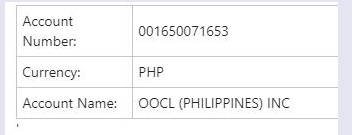
Account Name : OOCL (PHILIPPINES) INC
Account Number: 001650071653
Dollar account:
Account Name : ORIENT OVERSEAS CONTAINER LINE LIMITED
Account Number: 101650118382
Email Requirement: Send your validated bank deposit slip to [email protected] and remember to always provide either BL or invoice number for proper allocation of your payment and for our monitoring purposes.
4. Payment via Transfer from Other Banks: For fund transfer from other drawee banks, same account number of OOCL will be used. Additional information supplemented below.
Bank name: Banco de Oro Unibank
Swift Code: BNORPHMM
Branch: BDO PACO
Bank Address: 1054-1060 Pedro Gil St. Paco
Thank you very much for patronizing OOCL!
Respectfully Yours,
Customer Service Department
OOCL (Philippines), Inc.
(This is an electronic letter. No signature is required)
